The Rules Are the Art: Building Better AI Workflows
AI does not remove the craft. It moves the craft upstream into context, constraints, evidence, and judgement. Here is how to build AI workflows that produce usable work, not polished noise.
You can ask AI to make almost anything now. A screen. A strategy. A landing page. A workshop plan. A product flow. A brand concept. A sales email. A coaching guide. A dashboard. A whole application, if you are brave enough and slightly reckless enough.
But the question is not: can AI make something? Of course it can. The better question is: what do I need to build around AI so the output is actually useful? That is where the art has moved. Not into typing longer prompts. Not into asking for "premium design". Not into telling AI to "make it more modern". The art is in building the conditions that make good work possible. The rules are the art.

AI can move fast, but it still needs a destination
AI can do the walking and climbing, but you still need to pack its lunch and backpack.
If you know the destination, you can decide what equipment is needed. If you are climbing a mountain, you pack differently than if you are walking to the shop. If you are designing a production enterprise interface, you pack differently than if you are exploring early concepts. If you are writing a leadership article, you pack differently than if you are preparing stakeholder notes.
The problem is that many people start by asking AI to walk. They have not decided where they are going. They have not packed the right context. They have not explained what matters. They have not said what to avoid. They have not defined what good looks like. Then they are surprised when the output is generic, slightly wrong, or impossible to use. That is not really the AI failing. That is the brief failing.
I learned this the hard way building Sero
I saw this clearly while building Sero, my AI-assisted leadership tool for better manager 1:1 conversations. At the beginning, I did what a lot of visual founders and designers do with AI. I went in with big greenfield prompts.
"Build this." "Improve this." "Make it better." "Create the flow." "Design the dashboard." And at first, it felt brilliant. The UI looked good. The copy was decent. The screens felt like progress. As someone from a design background, seeing polished output is seductive. If I can see the thing, it feels real.
That was my downfall. I was building and building, but I was not always learning. I had nice-looking flows, but I did not always know why the AI had made certain decisions. I had screens that looked like product progress, but underneath there were hallucinations, structural gaps, weak logic, and no clear trace of how we got there.
The greenfield trap looks like this
- Big greenfield prompt
- Impressive output
- Visual progress
- More refinement
- Hidden mess
- Lost in the woods
The dangerous part was not that the output was bad. The dangerous part was that it looked good enough to keep going.
From YOLO and FOMO to plan-led design
A CTO advisor, Darren, helped shift my thinking. He pushed me away from output-first building and towards plan-led design. That changed the whole process. Instead of starting with the finished cathedral, I had to think about the foundations first.
Even the question of where to build became important. Was this a Replit job? Was it better in Claude? Should I use VS Code locally? Should I prototype in Google AI Studio? Each tool had a different role. Each one changed the kind of work I could do well. That forced a better question: what phase am I actually in?
- Some work is exploration
- Some work is planning
- Some work is testing
- Some work is interface design
- Some work is prompt improvement
- Some work is architecture
- Some work is learning
That shift moved me from YOLO and FOMO to Phase1.md and Phase2.md. That sounds simple, but it is a massive change. Because once you work in phases, the AI is no longer just making things. It is working inside a process.
The work needs to leave a trace
One of the biggest changes was making the system remember what it did. Not in a vague chat history way. In a proper working trace. For example, a run directory for each session: input.json, project-pack.md, prompt.md, output.md, eval.json, notes.md. That matters.
Before this, I would run 1:1 flows, adjust questions, improve CTAs, tweak wording, and keep going until things felt better. But I was not saving the water anywhere. The work flowed through the system, but it did not leave enough behind to learn from. A better AI workflow creates memory.
A good AI run saves
- What went in
- What prompt was used
- What came out
- What changed
- What failed
- What improved
- What should be tested next
Then you can zip up a directory and ask AI: compare runs 001, 002, and 003. What actually improved? What got worse? Which input changed the output most? What should we try next? That is a different kind of creativity. It is not just making. It is building a learning system.
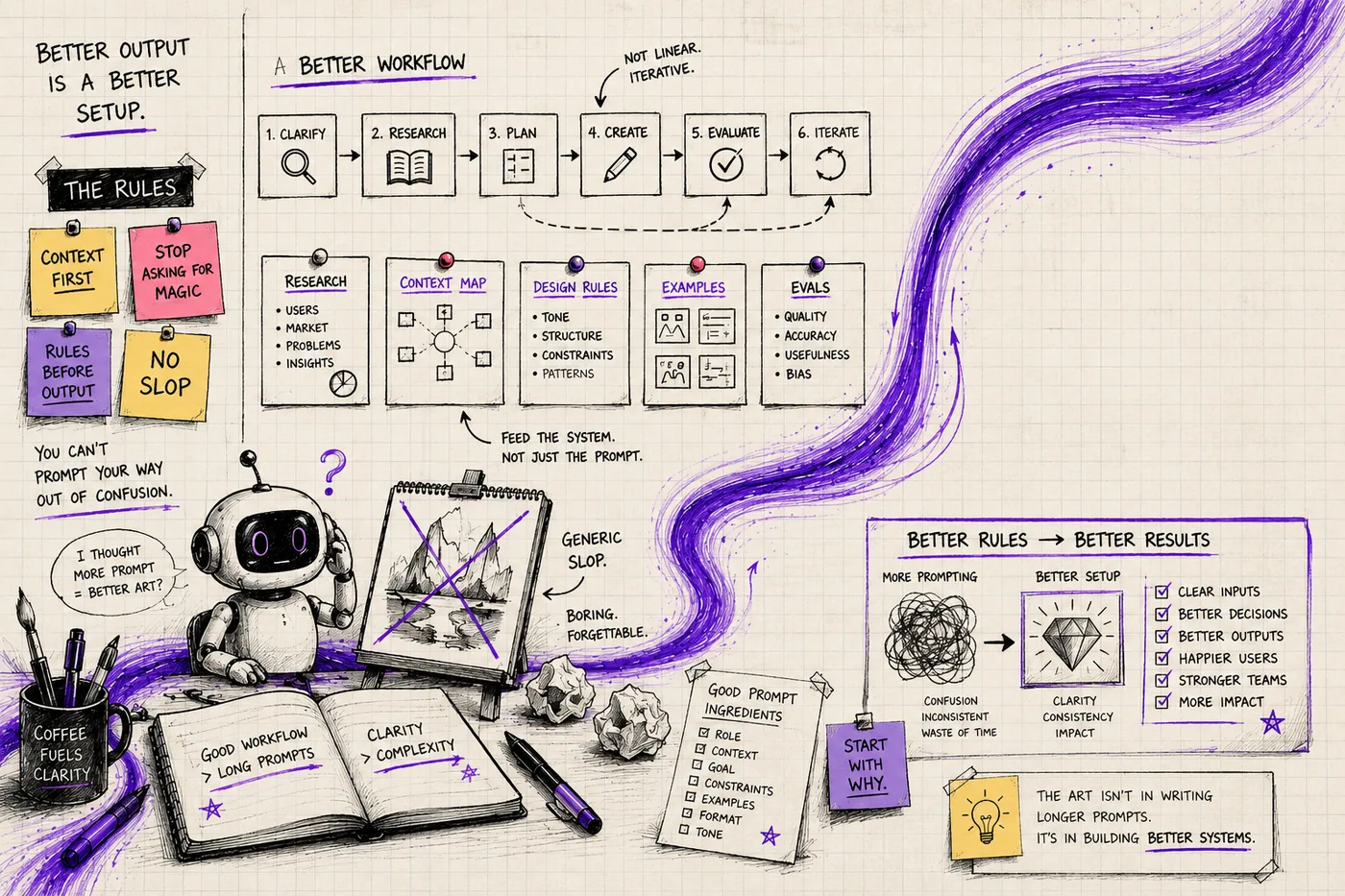
Context grounding matters more than clever prompting
There is a useful phrase for this: context grounding. AI needs grounding before it needs prompting. Without grounding, it creates from the average of what it has seen before. If you ask for a checkout flow, it will give you an average checkout flow. If you ask for a dashboard, it will give you an average dashboard. If you ask for a leadership article, it will give you average leadership content. Average is not enough.
Good work needs grounding in reality. That grounding usually comes from three places:
- Reality - user research, analytics, support patterns, customer issues. Pulls the model away from generic internet answers and towards the real problem.
- Constraints - design systems, brand guidelines, technical limits, business rules. Stops the model creating work that looks nice but cannot be used.
- Direction - workshop notes, past failures, expert examples, known good references. Shows the model what good looks like and what not to repeat.
Do not dump raw material into AI and call it context
Giving AI more stuff is not automatically better. A messy folder is not context. A wall of workshop notes is not context. A transcript dump is not context. A pile of screenshots is not context. It becomes useful when it is interpreted, labelled, and given a job.
For example, I would not usually give AI raw user research and say, "Use this." I would spend proper time turning qualitative and quantitative research into a clear reference file. That file would tell the model: where the information came from, what it means, and how it should be used. Critically - what it must not do with it. Don't quote participants. Don't invent statistics. Don't turn this into marketing copy.
The same applies to workshop notes. Do not just paste them in. Ask AI to help interpret them first, then save the interpreted output as a properly labelled working document with clear instructions on how the AI should treat each section. Now the notes are not just information. They are working material.
Enterprise UI needs rules, not vibes
This is especially true in enterprise UX and product design. If you are creating production UI, "make it premium" is useless. Premium according to who? Modern in what system? Beautiful by what standard?
If you are working inside an enterprise environment, you likely already have things that should constrain the work: corporate identity, design system rules, accessibility standards, component libraries, technical frameworks, security constraints, content rules, legal requirements, stakeholder expectations, and existing user behaviours. AI needs those as hard rules, not inspiration.
For early ideation, you can loosen the rules. That is fine. But for production work, especially in enterprise, design system rules are not optional. They are part of the craft.
Technical constraints are creative material
Technical constraints should not arrive at the end like a punishment. They should be part of the plan. If the AI designs something that cannot be built in your stack, it has not helped you. It has created theatre. This is where product, design, and development need to work together.
A good AI workflow should include technical constraints early: your frontend framework, styling system, component library, backend, database, current limitations, and performance goals. Now AI knows where the walls are. And strangely, that often makes the work more creative. Because creativity is not unlimited freedom. Creativity is making better choices inside real constraints.
Taste is still human work
There is another part we cannot avoid. Taste. AI can generate options. It can follow rules. It can compare patterns. It can even critique its own work to a point. But taste is still human work.
And taste is not just visual quality, although that matters. Taste means knowing when something is too generic. It means knowing what feels right for the audience, but only when that judgement is grounded in research and real understanding. It means knowing when the work has a thread running through it. It means knowing what to cut.
That last one is hard. Knowing what to cut is one of the skills that separates senior designers from advanced designers. Advanced designers can often add. Senior designers know what needs to be removed. Taste also means knowing when AI has technically answered the brief but missed the point. That happens all the time. The output has the right sections. The tone seems fine. The UI looks polished. But something is off. It missed the human point. It solved the wrong problem. It made the specific thing generic.
The risk is not always bad work - it is burnout
People often ask about the danger of AI for junior designers, founders, managers, or non-designers. I do not think the main danger is that they will make one bad thing. The bigger risk is that they will burn out. Because AI lets you build endlessly. You can create, refine, regenerate, redesign, rewrite, rebuild, and still not know what actually improved. That is exhausting.
Without rules, traces, evals, and taste, people can produce a huge amount of work without developing judgement. They are moving fast, but not learning fast. That is why examples, mentors, standards, references, and evaluation loops matter. Taste has to be trained. AI can help with that, but only if the process teaches you what changed and why.
Evals should be part of the creative flow
This is one of the biggest lessons for me. Evals should not be something you add after everything goes wrong. They should be part of the creative flow from the start. Not because the work is broken. Because that is how you know whether the work is improving.
A simple eval file scores each output on specificity (does it use the right context?), usefulness (could someone use this in the next 10 minutes?), safety (does it avoid risk language?), tone (does it sound human and direct?), and action (does it create a clear next step?). If any score is below 3, do not polish - regenerate from the weak section.
This changes the workflow. Instead of asking, "Do I like it?", you ask: did it pass? That does not remove human judgement. It strengthens it. And honestly, this is where AI can save real effort. Not by replacing thinking. But by taking the messy review work that used to involve days of effort, too much coffee, and crumb-covered home desks, and turning it into a repeatable quality loop.
Expert references need a job
I use expert references a lot. If I am writing influential sales text, I might want Chris Voss in the room. If I am working on teams and leadership, I might want Simon Sinek beside me. If I am reviewing product UX, I might want a strong design director lens. But this can easily become lazy.
Simply asking AI to "write this like Simon Sinek and Chris Voss" is not enough. Expert references should act like constraints and lenses, not costumes. You are not asking AI to impersonate someone. You are asking it to use a specific type of judgement for a specific job. The reference file should say: use Sinek for clarity of purpose, use Voss for negotiation-style phrasing, and always keep my own voice - plain English, practical, no hype.
Decide what AI is allowed to do with each input
This is the missing step in a lot of AI work. People say, "Use this." But what does "use" mean? Should the AI follow it exactly? Adapt it? Challenge it? Summarise it? Ignore it if it conflicts with something else? Use it only for planning? Use it only for evaluation? You need to decide.
A context map tells AI exactly how to treat each piece of input. Brand guidelines: follow as hard rules. Workshop notes: use as background context, do not quote directly. Support tickets: find patterns, do not design from one ticket. Analytics: use to create success checks, do not treat as user motivation. Previous failed version: use to avoid repeating mistakes. Expert examples: use as quality references, do not copy structure directly.
Do not ask AI to create until you have built the pack around it
If someone asked me what they should prepare before asking AI to make something important, I would not give them a fluffy checklist. I would tell them to build the pack. At minimum:
- project-pack.md - what we are doing and why
- research-summary.md - grounds the work in real user evidence
- ui-rules.md - keeps the output usable inside the actual product
- technical-constraints.md - stops fantasy being built
- context-map.md - tells AI how to treat each input
- expert-guidance.md - gives the work a quality lens
- eval.md - defines what good means before the work starts
- runs/ - a trace folder to learn from across iterations
That is not bureaucracy. That is the creative infrastructure. The project pack says what we are doing. The research summary grounds the work in reality. The UI rules keep the output usable. The technical constraints stop fantasy. The context map tells AI how to treat each input. The expert guidance gives the work a quality lens. The eval file defines what good means. The runs folder creates a trace to learn from. This is where the effort has moved. The work did not disappear. It moved into the system around the output.
When to use this approach (and when not to)
- Use this approach when the work matters: production UI, published writing, customer-facing flows, leadership communication, and any output tied to business decisions.
- Use this approach when quality needs to be repeatable across a team, not dependent on one person's memory.
- Use this approach when you need to learn from iteration, not just generate one-off output.
- Do not over-engineer this for quick throwaway drafts where the cost of being wrong is low.
- Do not build huge context packs when the problem is still undefined. Clarify the question first, then add structure.
- Do not treat this as a rigid religion. Keep the core principles and adapt the pack to the phase of work.
The real shift is from output to conditions
This is the part I want designers, founders, and product leaders to understand. Stop rushing straight into design and output-focused building. Start thinking about how to build a plan with AI. Not as a magic machine. Not as a junior designer you throw vague tasks at. Not as an all-knowing product strategist.
Treat AI as a working partner that needs: a destination, a map, a backpack, clear rules, real evidence, constraints, taste, evaluation, and memory.
In short
Practical checklist
- Define the decision you are trying to improve before prompting.
- Prepare labelled context, not raw document dumps.
- Set hard constraints for brand, accessibility, and technical feasibility.
- Run an eval against usefulness, specificity, safety, and tone.
- Store each run trace so the team can compare and learn.
Frequently asked questions
What is context grounding in AI workflows?
Context grounding means providing AI with specific, labelled, real-world information before asking it to create anything. This includes user research, brand rules, technical constraints, and past work. Without grounding, AI defaults to generic output based on patterns from across the internet.
Why do AI prompts produce generic results?
Generic results happen because the brief is generic. If AI has no context about your product, your users, your design system, or your goals, it will produce the average of everything it has seen. The fix is preparation before prompting, not longer prompts.
How do I build an AI context pack for design work?
Start with a project-pack.md describing the goal, audience, and constraints. Add a research-summary.md with interpreted user evidence. Include a ui-rules.md with hard design system rules. Add technical-constraints.md so AI knows your stack. Finish with an eval.md defining what good output looks like before you start.
What is an AI eval and why does it matter?
An eval is a simple scoring sheet that judges AI output against criteria you define in advance. It replaces "do I like it?" with objective criteria like specificity, usefulness, tone, and safety. Evals make taste visible, shareable, and repeatable across your team.
Can AI replace design taste and creative judgement?
No. Taste is still human work. AI can generate options, follow rules, and compare patterns, but it cannot know when something misses the human point. Knowing what to cut, what feels off, and when technically correct output is still wrong - that is where human judgement remains essential and irreplaceable.
What is the biggest risk of using AI to build products?
Burnout, not bad output. AI lets you build endlessly without necessarily improving your judgement. Without structured traces, evals, and real constraints, teams produce large amounts of work but do not learn why some of it is good and some is not. Moving fast without learning fast is the real danger.